Hermes Agent for accounting is worth a look for a small firm that drowns in receipts, statements and chase-up emails, as long as you treat it as an assistant that prepares the books rather than one that keeps them.
It won't replace your bookkeeper, your accountant or your accounting software.
What it can do is sort the paperwork, fill a prep sheet, read your card-payment data and draft the reminders, so the person who signs off starts from a tidy pile.
Below are five small-business examples, the risks, and who should skip it, all checked against the official Nous Research docs.
This page is about workflow, not tax, legal or financial advice.
Prefer to talk it through for your own firm? Book a free SEO strategy session with my team.
What Hermes Agent Is, In One Minute
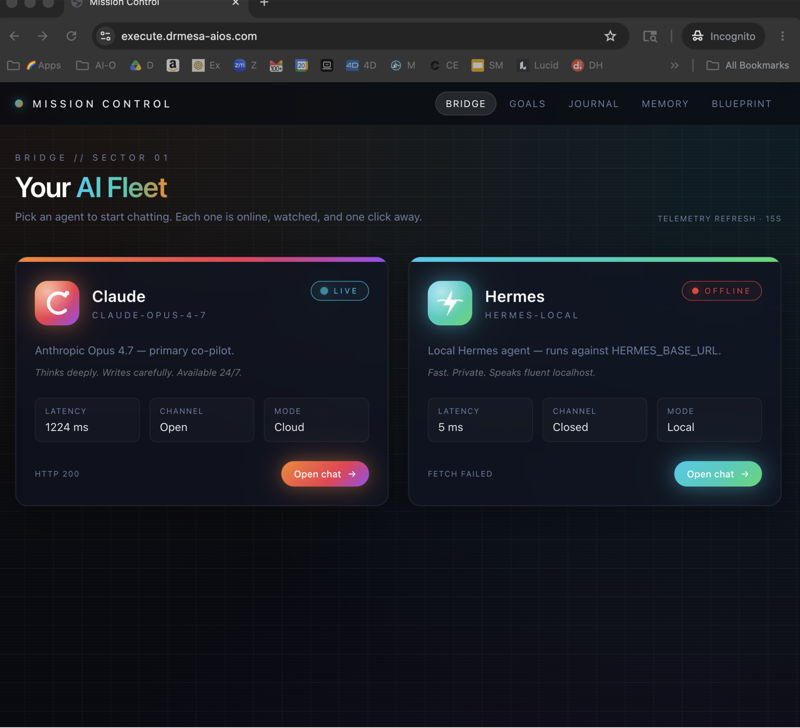
Hermes Agent is an open-source agent from Nous Research, released under the MIT licence on GitHub.
You install it on your own computer or server, connect a model, and give it jobs through chat, email or a schedule.
The latest stable release on 8 November 2026 is v0.23.0, from 5 November.
Because you host it, the files it reads stay where you put them, and you can even run it on a local model.
It also learns your way of working through skills: short written procedures it loads when a job needs them.
For a bookkeeping job, a skill is where your naming rules, your folder layout and your "never do this" list live.
The Bookkeeping Jobs It Can Take Off Your Desk
- Sorting incoming paperwork: an email address staff forward invoices to, with files named and filed by rule.
- Reading documents: Word and Excel files out of the box, PDFs through an optional converter.
- Filling a prep workbook: one row per document, with unclear fields flagged instead of guessed.
- Reading payment data: Stripe, Square and PayPal through entries in Nous's reviewed MCP catalog.
- Running checklists on a timer: a weekday tidy-up and a first-of-the-month prep pack.
- Drafting chase-ups: emails to clients or staff who owe you receipts, saved as drafts for you to send.
Each of those maps to a documented feature: the email gateway, document extraction, cron jobs and MCP servers.
What It Won't Do, However You Ask
There is no Hermes plugin or catalog entry for QuickBooks, Xero, FreshBooks, Wave or Zoho Books in the v0.23.0 catalogs.
So it can't post journals, reconcile inside your ledger or push invoices into your accounting app.
It also shouldn't pay anyone, issue refunds or file anything with the tax office, and the safe set-up below makes those jobs impossible rather than just unlikely.
If your hope was "the AI does my books", this isn't that.
If your hope was "Monday morning starts with the paperwork already sorted", it fits.
Which Plan Do You Need?
There's no Hermes plan to buy: the software itself is open source.
You do need a model, and the providers page covers cloud APIs such as OpenRouter and Anthropic, the Nous Portal sign-in, and self-hosted options like Ollama.
For finance paperwork, the docs list local Ollama as a fit for privacy-sensitive work and offline use.
Your payment apps need their own accounts, and Hermes signs in to Stripe, Square or PayPal through their own OAuth screens.
🔥 Want to see a bookkeeping agent set up before you try one? Inside the AI Profit Boardroom you get step-by-step video trainings, the installable Agent OS, four coaching calls a week where you can ask about your own paperwork, and 3,400+ members. → Join the AI Profit Boardroom
Use Case: A Hair Salon's Supplier Receipts
A salon buys colour, towels and retail stock from four suppliers, and the receipts end up in three people's inboxes.
- The owner sets up a separate mailbox for the agent and lists the three staff addresses as the only allowed senders.
- Staff forward every supplier email there, the moment it arrives.
- Hermes saves the attachment, names it by date and supplier, and adds a row to a prep sheet.
- Every Friday a scheduled job emails the owner a short list: what came in, and what's marked unclear.
- The bookkeeper picks up the folder at month end instead of chasing three inboxes.
One catch: the gateway ignores automated senders like noreply addresses, so receipts must be forwarded by a person, not auto-forwarded straight from the supplier.
Use Case: A Café Taking Card Payments On Square
The Square entry in the Nous-approved MCP catalog covers "Catalog, orders, and payments".
- The owner connects Square read-first, with every write call set to ask before it runs.
- A Monday job asks for last week's orders and payments and writes a one-page summary by day.
- The owner compares it with the till report and notes anything that doesn't line up.
- The bookkeeper gets the summary and the owner's notes with the month's pack.
Hermes reads and summarises here; it never changes an order or a payment.
The useful part for the owner is the habit: the weekly comparison happens every Monday, not only when something looks wrong.
Use Case: An Online Shop Watching Failed Stripe Payments
The Hermes webhooks docs name Stripe among the services that can start an agent run, and the automation blueprints include a payment-monitoring example.
- Stripe sends failed-payment and dispute events to the shop's Hermes webhook.
- Hermes checks the signature, reads the event and writes a short note: what failed and the reason Stripe gave.
- Disputes get flagged as urgent in the owner's chat.
- The owner decides whether to contact the customer; any email the agent prepares stays a draft.
Webhook runs have nobody watching, so the docs default them to refusing risky commands rather than waiting for an answer.
That suits a shop: the alert arrives, and the action waits for you.
Use Case: An Agency Chasing Staff Expense Claims
A ten-person marketing agency loses a day every month chasing receipts for card spend.
- A Monday job reads the card export the office manager saves to a shared folder.
- It lists each line with no matching receipt in the receipts folder.
- It drafts one short reminder per person, listing their missing items.
- The office manager reads the drafts and sends them.
The agent prepares the nudge; a person still decides who gets it.
If the card export is an Excel file, Hermes reads it directly; if it's a CSV, the bundled Office skill handles that format too.
Use Case: A Small Practice With Several Clients
A two-person bookkeeping practice can give each client a separate Hermes profile, each with its own settings, memory, skills and schedule.
- One profile per client keeps each client's files and notes apart.
- Each profile carries a short skill with that client's naming and filing rules.
- A first-of-the-month job in each profile builds a prep pack and a list of missing documents.
- The bookkeeper reviews each pack before any figure goes near the client's ledger.
The docs warn against running two agents on the same profile, so one profile per client is also the tidy way to keep the agents from mixing their notes.
For a practice, the bigger win is consistency: every client gets the same checklist on the same day.
Five Risks To Weigh Before You Switch It On
- No ledger connection: exports and imports stay manual, so the time spent there doesn't go away.
- Outgoing email isn't gated: approvals in Hermes cover risky commands, not messages, so "draft only" has to be written into every job.
- Scanned paper reads as blank: PDF conversion reads the text layer only, so image-only pages need an extra OCR step.
- Model mistakes: any figure it copies can be wrong, so every number needs a human check against the original.
- Set-up is technical: it means a command line, environment settings and a few config keys, or someone who can do that for you.
The Guardrails That Make It Safe For A Small Firm
- Give the books work its own profile, so finance logins live apart from everything else.
- Mark payment servers
trust: untrustedso every write call asks first, and exclude refund and delete tools, as the MCP config reference shows for Stripe. - Keep scheduled runs blocked from dangerous commands, which is the default
cron_mode: denyon the security page. - Allow only your own staff to email the agent.
- Put "draft only, never send" into every prompt that touches a client.
📞 Not sure an agent is worth it for your firm yet? Book a free SEO strategy session and my team will look at your business and tell you where automation fits and where it doesn't. → Book your free call with my team
Who It Fits, And Who Should Skip It
It fits: owners and bookkeepers who already have someone technical nearby, who want paperwork sorted and drafts written, and who like keeping data on their own machine.
Skip it: if you want the books done for you, if nobody on the team will touch a config file, or if you need a direct link into your accounting software today.
There is a middle path too: have someone technical do the one-off set-up, then let the owner run it day to day through email and a weekly summary.
The gateway installs as a background service, so after set-up the day-to-day work happens in email and chat.
If a hosted option suits you better, our Grok Bot for accounting review covers a cloud agent with its own draft-before-send email.
How To Start Without Touching The Live Books
- Pick one job, such as filing supplier receipts, and nothing else.
- Run it for a month on copies of your files, never the originals.
- Have the bookkeeper check every row it produced and note each correction.
- Add those corrections to the agent's house rules.
- Only then add a second job, such as the Monday payment summary.
A month of checked output tells you more than any demo, because it shows you exactly which documents trip the agent up in your business.
The Verdict For Owners
Hermes is a strong paperwork assistant and a poor bookkeeper, and the docs are clear about which half it covers.
If your pain is collecting, naming and chasing, it earns its place.
If your pain is coding transactions and closing the month, that work still belongs to a person and your accounting software.
The AI Profit Boardroom has the walkthroughs for the paperwork side, and the members there share what they automate first.
Also On Our Network
- 🌐 The eight-step books profile build, from receipts mailbox to month-end cron
- 🌐 A nine-criteria scorecard for bookkeeping work, with strengths and limits
- 🌐 Five copy-paste bookkeeping prompts and a weekly rhythm for your Agent OS
- 🌐 Which cloud or local models to pin to each bookkeeping job, with scores
- 🌐 The complete Hermes Agent for Accounting guide on the AI Profit Boardroom blog
FAQ: Is Hermes Agent For Accounting Worth It For A Small Firm? Five Real Use Cases
Does Hermes Agent replace a bookkeeper?
No. It sorts paperwork, fills prep sheets, reads payment data and drafts reminders, while a person checks figures and makes every decision in the books.
Can it work with QuickBooks or Xero?
Not directly. The v0.23.0 catalogs have no entry for QuickBooks, Xero, FreshBooks, Wave or Zoho Books, so a person moves files in and out by export and import.
Is there a Hermes plan to pay for?
No. Hermes is open-source software under the MIT licence. You choose a model provider, or run a local model.
Will it email my clients without asking?
Hermes has no documented approval step for outgoing messages, so write draft only into every job and have a person send each email.
Is it safe to connect my Stripe account?
Connect it read-first: mark the server untrusted so every write call asks, and exclude the refund and delete tools as the docs show.
📺 Video notes + links to the tools 👉
🎥 Learn how I make these videos 👉
🆓 Get a FREE AI Course + Community + 1,000 AI Agents 👉
About Julian
I'm Julian Goldie, an SEO entrepreneur, author and founder of the AI Profit Boardroom, which has 3,400+ members.
I help business owners scale with AI agents, automation and SEO.
- I've built a 7-figure SEO and link building agency, Goldie Agency, with a team of 70+ SEO experts.
- I've grown a YouTube channel to 400,000+ subscribers.
- I wrote "Link Building Mastery".
- My Udemy courses have taught over 29,000 students.
→ Get my best AI training inside the AI Profit Boardroom
Start with one paperwork job this month, and book a free strategy session or join the AI Profit Boardroom if you want help deciding whether Hermes Agent for accounting fits your firm.